Saturday, July 16, 2011

OPDA, cer.s603rd.cn and many other symbian .cer/.key file generator sites are not working anymore

Bad news for Symbian fans as OPDA (and other such sites) has stopped working to give you an IMEI specific cer/key file, required to sign an unsigned app sis/sisx file). In fact cer/key files are also necessary to hack the phone (required at least once to sign the hack_cert_installer.sis or helloox sis file).
This malfunction is the result of recent changes made by “Symbian Signed” (the official Symbian certificate issuer) in the rules and regulation of cer/key file generating process. I myself applied for cer/key file (for my swanky new N8) at all such sites earlier this month but still to get one (the status showing as pending).
Hopefully this change is temporary and these sites resume their services soon.
If you don’t know what is the importance of cer/key file then refer to this “Sis/sisx” signing tools and tutorial

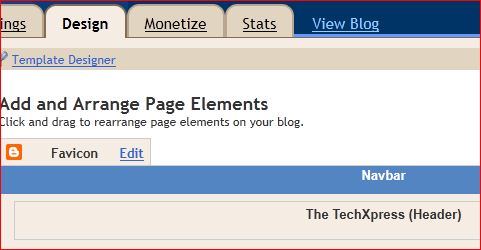
Blogger adds “Favicon” edit option under “Design” tab – now add a favicon easily to a Blogger blog

In a series of improvements Blogger recently added a “Favicon edit” option button under “Design/Page Elements” tab. Via this option one can upload a favicon image to a Blogger blog and it will automatically be added to template code as a favicon entry. Earlier favicon had to be added manually to a blogger blog by adding its code in the “head” section of template (While the favicon image had to be uploaded somewhere else). Now Blogger will host the favicon image.
However you can still add the favicon directly into the template code in case you want to. And of course no need to do so if you already have one.

For those of you who don’t know – favicon is a tiny image that appears just left to the URL bar of browser when a site is loaded. Favicon is used as a brand symbol or icon by most of the famous blogs and sites.

UC Browser version 7.8 (official English version for Symbian, Java, Android and Windows Mobile) is available for download

Yesterday UC browser team updated their popular mobile web browser to version 7.8 with many improvements and bug fixes. For Android, It is the first major release after version 7.2 with more stability, faster speed and enhanced UI
As usual, UC team has given more emphasis on faster browsing speeds, more features and btter user experience. A new “View Image” option has been added to the menu to view all the pics embedded in a web page you are browsing. Frankly speaking I am not a big fan of UC Browser, yes it is fast (loads pages quickly) and has a very good download manager but it still has not come at par with Opera Mini or Bolt in terms of visual appearance of loaded pages. It looks somehow that we are indeed browsing at a mobile, perhaps it does not support latest web standards (HTML5, CSS3 etc). Anyway here are the main new features of version 7.8

1. 30% increase in speed over version 7.7

2. Full touch support including “swipe left or right” to move back or forward at a page

3. See all the images on a page one by one by flipping over

4. An advanced “Bookmark manager”

You can download UC Browser (for Java, Symbian 2nd, 3rd, 5th and ^3, Android, Windows Mobile) English version from www.ucweb.com